Managing your email notification preferences
NAVIGATION My Account > Email Preferences
PERMISSIONS All users
The Notification Preferences page allows any user to manage which email notifications they receive related to certain activities in the myITprocess account. By default, all email notification options are enabled. These settings apply at the user level and are not shared across accounts.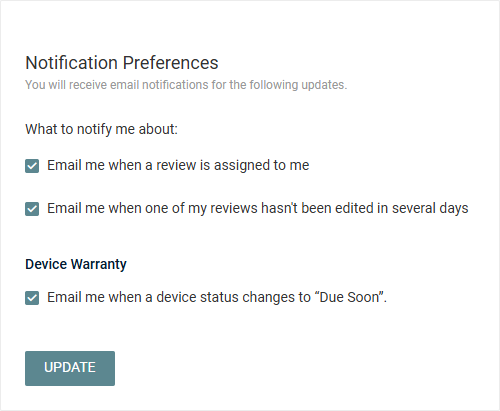
Select or clear the checkboxes for the following options to start or stop receiving email notifications for these activities:
- Email me when a review is assigned to me: If selected, you will receive an email notification to the email address associated with your myITprocess account when you are assigned to a review as either the engineer or vCIO resource.
- Email me when one of my reviews hasn't been edited in several days: If selected, you will receive an email notification to the email address associated with your myITprocess account when a review you are assigned to has not been edited in several days.
- Email me when a device status changes to “Due Soon”: If selected, you will receive an email notification to the email address associated with your myITprocess account when a device’s warranty status changes to Due Soon, helping you stay informed before the warranty expires. This status is driven by the setting configured in the Warranty tab on the Account Settings page. Refer to To learn about device warranty statuses, refer to Device Lifecycle Management overview.
After making any changes, click Update.


