Configuring global account date, time, and currency settings
NAVIGATION My Account > Account Settings > General
myITprocess administrators are responsible for defining global date, time, and currency formats that apply to all users in the account. The selected formats persist across all user sessions and devices.
This feature ensures consistent formatting across the platform, supporting internationalization and improving usability for global teams.
Profile settings
The following global profile settings are configured in the General tab on the Account Settings page: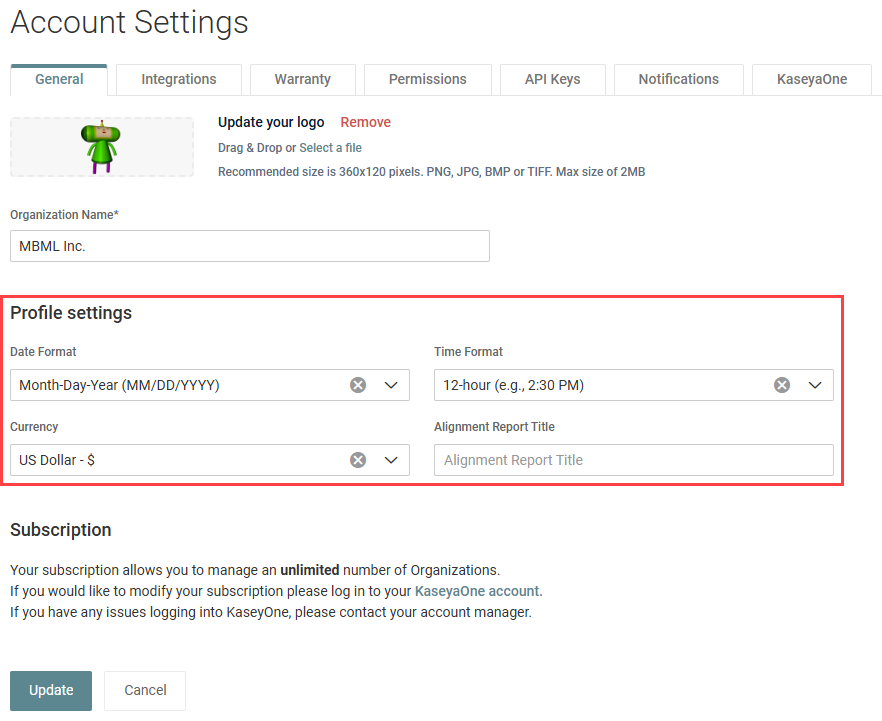
 Date Format
This field allows you to select one date format option that encompasses both short date and long date formats. The following options are available to apply to the entire account:
- Day-Month-Year (DD/MM/YYYY)
- Month-Day-Year (MM/DD/YYYY)
- Year-Month-Day (YYYY/MM/DD)
EXAMPLE
Long date format: 31 December 2027
Short date format: 31/12/2027
EXAMPLE
Long date format: December 31, 2027
Short date format: 12/31/2027
EXAMPLE
Long date format: 2027 December 31
Short date format: 2027/12/31
If an option is not selected, the Day-Month-Year (DD/MM/YYYY) format is used by default.
For details on where these date formats appear in myITprocess, refer to Date and time format locations.
Time Format
This field allows you to select one of the following time format options to apply to the entire account:
- 24-hour (e.g., 14:30)
- 12-hour (e.g., 2:30 PM)
If an option is not selected, the 24-hour format is used by default.
For details on where this time format appears in myITprocess, refer to Date and time format locations.
Currency
This field allows you to select a currency format to apply to the entire account.
If an option is not selected, the currency format from browser settings is used by default. Refer to How do I set the currency in the Strategic Roadmap?
The currency format is reflected in the following locations:
- Home page dashboard widgets
- Strategic Roadmap
- Strategic Roadmap Report
- Recommendations
- Meetings
- Budget Report
- QBR reports
- All PDFs that include information about money
Alignment Report Title
This field allows you to enter a custom Alignment Report title, which appears on the first page of that report and in the report PDF file names.
If an option is not selected, the title Alignment Report is used by default.
Refer to Alignment Report.
Date and time format locations
The following table outlines the fields throughout myITprocess that reflect the date and time formats configured in the account settings.
Key
- Short Date: (DD/MM/YYYY), (MM/DD/YYYY), or (YYYY/MM/DD)
- Long Date: Day-Month-Year, Month-Day-Year, or Year-Month-Day
- Time: 24-hour or 12-hour
| Short Date | Long Date | Time | |
|---|---|---|---|
| Home > Contracts | ✓ | ||
| Home > Device Warranty Lookup | ✓ | ✓ | ✓ |
| Standards | ✓ | ||
| Alignment | ✓ | ||
| Strategy | ✓ | ✓ | ✓ |
| Backup Dashboard | ✓ | ✓ | |
| QBR Report Builder | ✓ | ✓ | |
| Alignment Report | ✓ | ||
| Progress Report | ✓ | ||
| Overview Report | ✓ |
How to...
Configure global profile settings
Complete the following steps to configure profile settings for the entire myITprocess account:
- In the upper-right corner of the header, click your username (My Account) and select Account Settings. The General tab is selected by default.
- In the Profile settings section, select values from the following drop-down menus:
- Date Format: For details, refer to Date Format.
- Time Format: For details, refer to Time Format.
- Currency: For details, refer to Currency.
- In the Alignment Report Title field, enter a custom title for the Alignment Report, if desired. For details, refer to Alignment Report Title.
- Click Update.


