Filtering the Strategic Roadmap
NAVIGATION Strategy > (select an organization) > (select a starting year) > (click the filter menu  )
)
Filtering an organization's Strategic Roadmap allows you to focus on specific client information, which is particularly helpful when managing a large number of initiatives and recommendations. To access filters after selecting an organization and starting year for the roadmap, click the filter menu in the upper-right corner of the page.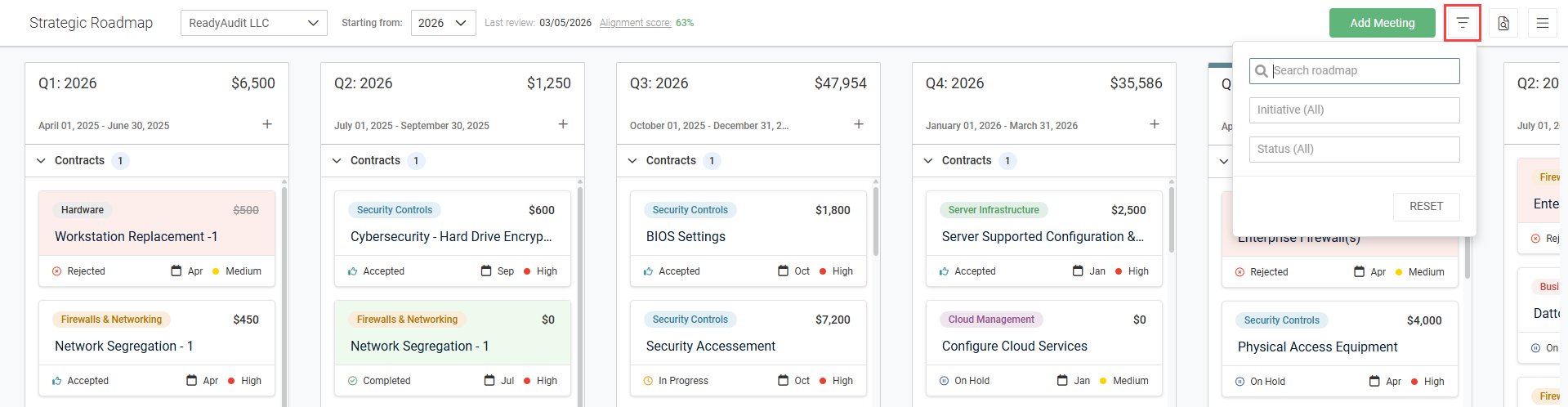
Filter criteria
Three filters are available for use:
- Search roadmap: Enter a word or phrase to filter the roadmap by matching recommendation and contract titles.
- Initiative: From the drop-down menu, select one or more initiatives to filter the roadmap by recommendations and contracts assigned to the selected initiative(s). With no filtering, recommendations and contracts from all active initiatives are displayed.
- Status: From the drop-down menu, select one or more recommendation statuses to filter the roadmap by recommendations with the selected status(es). With no filtering, all recommendations are displayed.
NOTE This search does not detect recommendation or contract details.
When filters are applied, a number badge appears on the filter icon indicating how many results match the configured filter.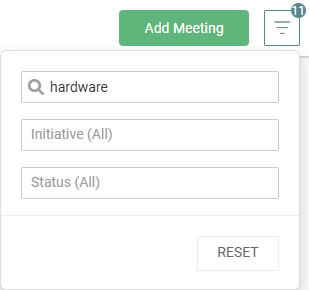
To clear an individual filter, click the applicable field and then click X. To clear all filters, click Reset.


