myITprocess 6.5.8.0 release notes: March 12, 2026
This release includes a new feature, enhancements, and bug fixes.
New feature
QBR report templates
You can now create, save, and reuse custom templates for Quarterly Business Review (QBR) reports directly in the QBR Report Builder.
QBR report templates make it easy to standardize and streamline your QBR process. Save time by avoiding repetitive formatting, ensure consistent client communication, and scale QBR delivery across your team. Templates help you deliver high-quality, professional reports every time, no matter who is preparing them.
How it works
- Save any QBR report as a reusable template, or create new templates from scratch.
- Templates retain your custom section names, order, and settings.
- Manage all templates in a central template library, allowing you to preview, edit, duplicate, or delete as needed.
- When creating a new QBR, simply select a template to instantly apply your preferred structure, settings and formatting.
Refer to Templates in Using the QBR Report Builder.
Enhancements
Source region displayed in organization mapping
The Setup Organizations page now displays the source region underneath each organization or site connected from KaseyaOne that is either available for mapping or is mapped. This enhancement reduces confusion by distinguishing duplicate organizations from those in the same KaseyaOne tenant with different data sources.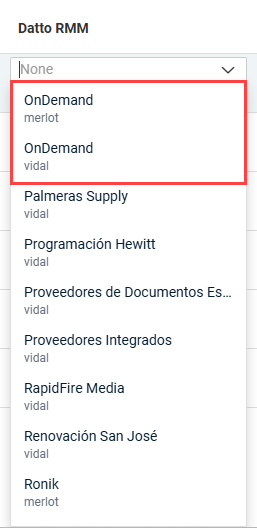
Multiple recommendations for a single hardware asset
Previously, the Create Recommendation option on the Device Warranty Lookup page was hidden once a recommendation existed for a hardware asset. This update removes that limitation, allowing you to add additional recommendations for one asset.
All recommendations linked to an asset are now visible across the Device Warranty Lookup and Strategic Roadmap pages, ensuring consistency in your device lifecycle management workflow.
Fixes
Meeting summary PDF formatting
The following formatting issues in meeting summary PDFs have been fixed to better reflect the meeting structure and improve readability:
- The agenda item order now matches the order set in the meeting agenda.
- The organization logo is no longer missing.
- Unnecessary page breaks that caused large empty spaces have been removed.
HP warranty lookup errors
Issues that could cause HP warranty lookup batches to fail during synchronization have been fixed, ensuring warranty information is successfully returned for all valid devices in the batch. Previously, a request could fail for the following reasons:
- Duplicate serial numbers with different capitalization triggered a duplicate key error.
- Trailing spaces in serial numbers triggered a field format validation error.


