myITprocess 6.5.6.0 release notes: December 17, 2025
This release includes a new feature and a few enhancements.
New feature
QBR Report Builder: Cover page customization
You can now fully customize the cover page of your QBR reports to match your organization’s brand style. Upload your own background image, adjust its blur level, change the displayed organization name, update the report description, and select a custom font color for all cover page text. These enhancements make it easy to create professional, branded reports that reflect your organization’s identity. Refer to Customize a QBR report or template cover page in Using the QBR Report Builder.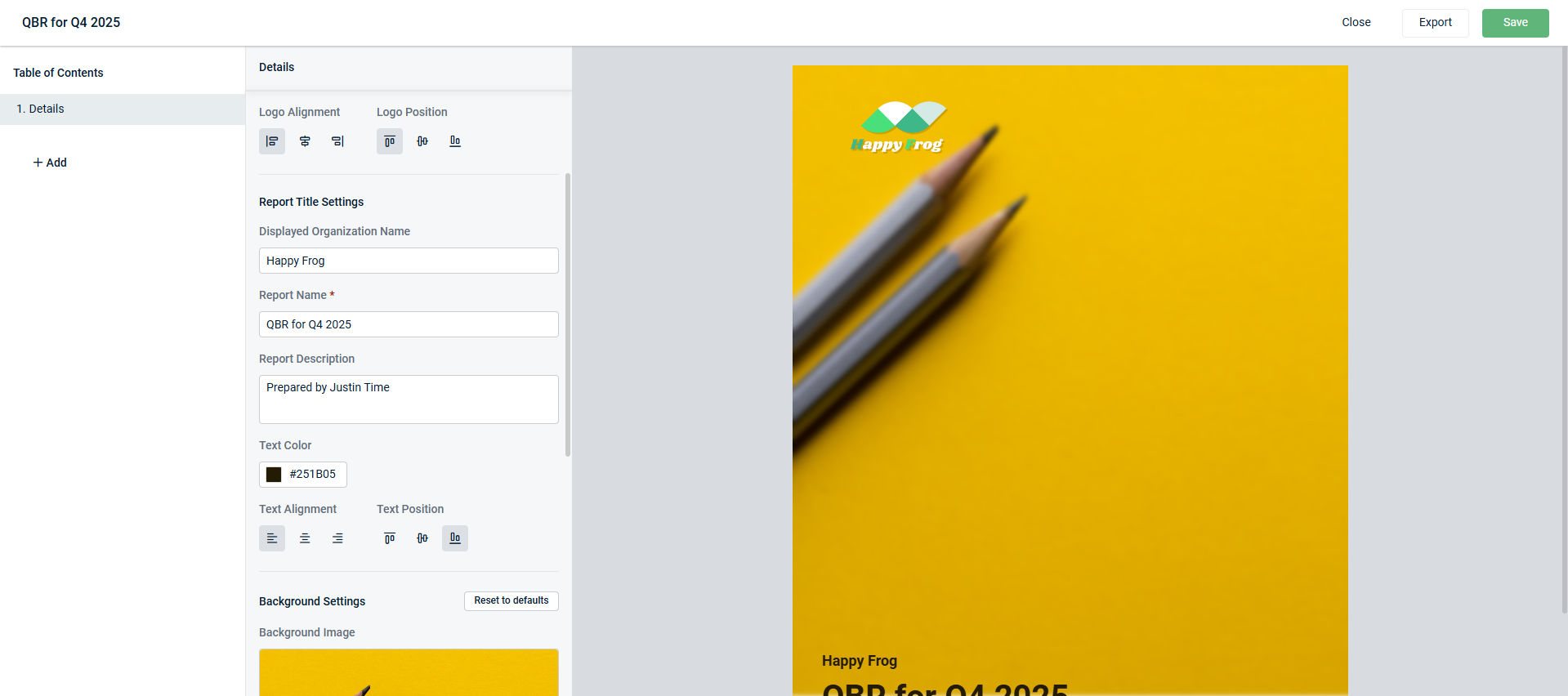
Enhancements
Templates for Device Warranty Lookup recommendations
When creating recommendations on the Device Warranty Lookup page, you can now use your templates. This feature streamlines and standardizes the process for creating recommendations for expired configurations, following the same workflow used on the Strategic Roadmap page. Refer to Create a recommendation for a device in Device Lifecycle Management overview.
PDF report for Device Warranty Lookup
You can now export the warranty lookup table to a PDF with all your current settings applied, including column selections, filters, sorting, and search. Refer to Export device data in Device Lifecycle Management overview.
Updated resource links
The following links have been updated in the myITprocess user interface:
-
What's New in the Help menu now links to the Kaseya innovations page for myITprocess.
-
A link titled Release Notes has been added to the Help menu to provide you quick access to the myITprocess release notes landing page.
-
The Learn More about KaseyaOne link on the login page has been updated to point to the overview page in the KaseyaOne Help system.
This change aligns with our Kaseya-wide standardization initiative, enhances transparency regarding platform updates, and enables you to better understand the value delivered through new features.


