myITprocess 6.5.11.0 release notes: June 4, 2026
This release includes new features, enhancements, and bug fixes.
New features
QBR reports multi-language support
You can now generate QBR and Executive Summary reports in multiple languages, making it easier to deliver client-ready presentations without the need for manual translation or rebuilding slides outside of myITprocess.
Currently supported languages
- English
- German
- Spanish
Multi-language translation is supported for system-generated labels and headings, boilerplate text across supported QBR report templates, and Executive Summary sections and widgets. Custom content you add, such as notes, business analysis, descriptions, and custom slide content, will appear exactly as entered.
How it works
- Configure a default report language at the account level (company-wide default for QBR output). Refer to General in Configuring global account settings.
- When building a report, choose the report language per organization/report. Refer to Configure the QBR report language in Using the QBR Report Builder.
- When you preview, export, or print the report, supported system text is automatically displayed in the selected report language.
NOTE Additional languages and localized areas will be added over time.
INKY integration
Customers using INKY can now include INKY data in QBR reports, Executive Summary reports, and meeting agendas and presentations within myITprocess.
INKY email security and productivity insights are available in your client-facing reporting workflow for integrated organizations, allowing you to highlight security trends, threat activity, and operational value during business reviews.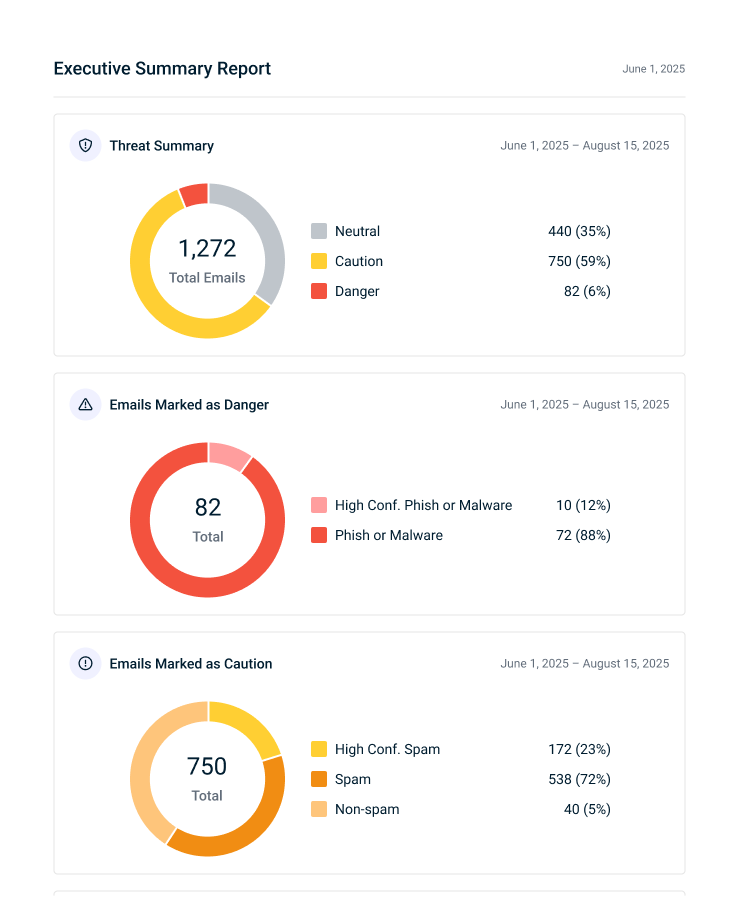
When generating reports, you can choose which of the following INKY data to include or exclude based on the selected reporting date range:
- Threat Summary
- Emails Marked as Danger
- Emails Marked as Caution
- Threats Over Time
- Graymail & Productivity (messages remediated and hours saved for all users)
You have the option to customize time-savings assumptions used in productivity calculations.
NOTE Additional INKY reporting enhancements and metrics will be added over time.
Refer to Integrated Executive Summary reporting.
Enhancements
KaseyaOne Unified Login automatically enabled for new tenants
KaseyaOne Unified Login is now enabled by default in newly provisioned myITprocess tenants, removing the need for manual setup and ensuring a consistent login experience for users from day one.
License overuse visibility and enforcement
myITprocess now actively monitors and enforces license entitlement limits. When an account's active organization count exceeds its subscription limit, a persistent banner appears on the Organizations and Setup Organizations pages showing how many organizations are over the limit. New organization creation is blocked until the account no longer exceeds its limit.
If overuse continues for 30 consecutive days without remediation, the account is suspended. During suspension, users with Full permission for Organizations can still log in and access the Organizations page to deactivate organizations and resolve the overuse condition. All other access is restricted until the account no longer exceeds its limit.
Searchable Owner field for Autotask opportunities
When creating an Autotask opportunity from a recommendation, the Owner field is now searchable, allowing you to quickly find and select the right owner by typing their name. This enhancement makes opportunity creation faster and more efficient for teams with large user lists. Refer to Create Autotask opportunities for myITprocess recommendations.
Fixes
- Currency changes made on the Account Settings page by a user with the IT Provider Admin role now take effect immediately for all users. Previously, users with other roles saw USD until they navigated away or re-logged in.
- The organization deactivation message no longer displays a 12-month reactivation warning in accounts with Kaseya 365 Ops or IT Glue Plus (unlimited) licenses. The messaging now accurately reflects that these providers can reactivate organizations at any time.
- Cisco Meraki End-of-Life dates now sync reliably.
- The standalone Progress Report and the Progress Report section in the QBR Report Builder no longer return errors in certain configurations.
- Compliance Manager issue type names are now displayed consistently across QBR reports, standalone Progress Reports, and their PDF exports.
- On the Standards page, tag names are now properly displayed in the Tags column.
- On the Standards page, when adding or editing a section or category with a large number of tags, you can now successfully scroll through the list in the Tags section.


