myITprocess 6.5.13.0 release notes: July 28, 2026
This release includes a new feature, enhancements, and bug fixes.
New feature
Smart Insights: Suggested devices
Designated alignment review questions now surface relevant devices from your synced inventory directly in reviews, powered by Device Warranty Lookup across IT Glue, Cisco Meraki, and SonicWall sources. myITprocess builds a profile for each supported question and automatically ranks matching devices by type, age, and warranty status so you can spot aging or at-risk hardware without leaving the review. Assignees can accept suggested devices to link them to the question or dismiss suggestions that are not relevant.
Refer to Smart Insights: Suggested devices.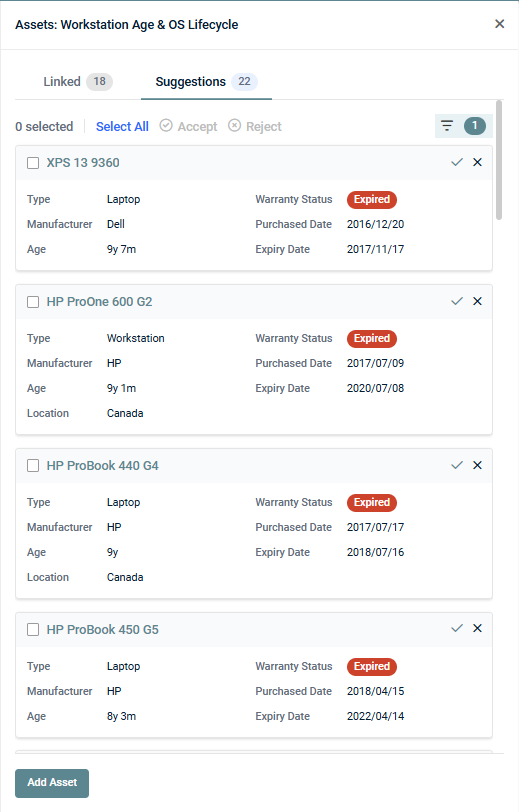
Enhancements
Standards Library refresh
The Standards Library has been updated with standards reflecting current best practices and common applications across the industry. You can import these new sections, categories, and questions via myITemplates.
The previous default standards remain available (labeled v2020.5), and existing organization templates are not affected by this update.
Refer to Core standards in Using myITemplates.
Fixes
- When creating a QBR report from a template that includes a Datto EDR Executive Summary section, the selected Datto EDR charts are now consistently preserved as defined in the template.
- QBR reports now display a "This page requires attention. Please review all inputs and data" message when the Displayed Organization Name field exceeds 50 characters, replacing the misleading "Missing information or empty data" error.
- Recommendation budget dates in the Strategic Roadmap section of QBR reports now match the dates shown for the same recommendations on the Strategic Roadmap (Strategy page).
- Autotask opportunities are now correctly scoped across all user accounts.


