Smart Insights: Suggested devices
NAVIGATION Alignment > My Reviews or All Reviews > (select a review) > (click the assets icon for a question)
Directly in the context of alignment review questions, myITprocess can surface an organization's relevant hardware devices. This feature reduces the time needed to locate and link assets from external tools.
BEFORE YOU BEGIN To learn about reviews, refer to Using the Standards Library and Creating reviews.
When you open a review question that relates to hardware devices, myITprocess automatically analyzes the question and queries the organization's internal asset inventory populated via Device Warranty Lookup. For details about this feature and how to sync an organization's devices to myITprocess, refer to Device Lifecycle Management overview.
From the Assets pane, you can review, accept, and link relevant devices surfaced alongside the question without leaving the review.
Prerequisites
- Configure at least one device lifecycle integration to sync organizations' devices to myITprocess:
- The organization the review is for must be mapped to the corresponding organization in at least one integrated data source. Refer to Performing organization mapping.
How question profiling works
For each question in the Standards Library, myITprocess builds a question profile by analyzing the question title and text, category and section names, tags, and the Why are we asking and How to find the answer fields. The profile serves two purposes:
- Scope determination: Decides whether the question is device-related and therefore eligible for suggested devices. Questions without device-related signals do not display suggestions.
- Filtering and ordering: Derives the device type (for example, workstation, server, firewall, access point) and supportability criteria (age thresholds, warranty state) used to filter and rank the suggested devices list.
Device types are inferred from keywords in the question profile.
EXAMPLE Terms like "workstation," "laptop," or "PC" map to the workstation type, while "firewall," "gateway," or "SonicWall" map to the firewall type. When a device type cannot be determined, the broader device inventory for the organization is queried.
When the question contains supportability language (for example, "less than 5 years old" or "under warranty"), myITprocess uses those thresholds to prioritize devices that are closest to being out of compliance. The engineering answer may default to No for questions where the suggested devices are already expired or beyond the age threshold. Additional supportability profiles will be added over time for this feature.
Effect of editing a question on linked suggestions
The question profile is computed and stored each time a question is created or saved in the Standards Library. If you edit a question and save it, the profile is recalculated.
When a question's profile changes, any devices that were linked to the question via accepted suggestions are automatically removed from that question in all reviews where they were linked. Devices linked manually (not from suggestions) are not affected.
This means that if an engineer has already accepted suggestions and linked devices to a question in an active review, and the question text is subsequently edited in the Standards Library, those suggestion-linked devices will be unlinked from the review question. The engineer will need to review the updated suggestions and re-link devices as appropriate.
Unlinking flexible assets in a review
IT Glue flexible assets linked to a question behave differently from devices when removed in a review.
When a flexible asset is linked to a question via the organization template, that link is shared between the template and any review containing that question. Refer to Adding assets to organization templates in IT Glue integration. As a result, if you remove a flexible asset from a question while working in a review, the asset is also removed from the question in the organization template. Alternatively, unlinking a device from a question in a review does not affect the organization template.
TIP If you need to remove a flexible asset from a specific review only, update the organization template after the review is complete to restore the original template configuration.
Assets indicators in review questions
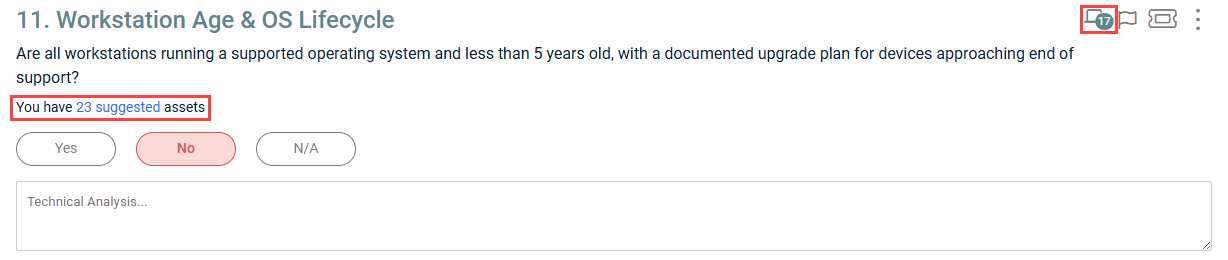
Assets icon 
If devices and/or flexible assets are linked to a question, the assets icon in the question toolbar displays a counter showing the total number of linked items from all sources. Clicking this icon opens the Assets pane with the Linked tab selected.
Suggestions link
On device-related questions with suggestions available, a You have X suggested assets link appears below the question text. Clicking this link opens the Assets pane with the Suggestions tab selected.
NOTE This link is not displayed if a question is not device-related, if no matching devices exist in the inventory, or if all suggestions have already been accepted or rejected.
Assets pane
Clicking the assets icon or You have X suggested assets link for a question opens the Assets pane. The pane contains two tabs: Linked and Suggestions.
 Linked tab
This tab displays all devices and flexible assets currently linked to the question, grouped by a Devices heading and then a Flexible Assets heading, if applicable.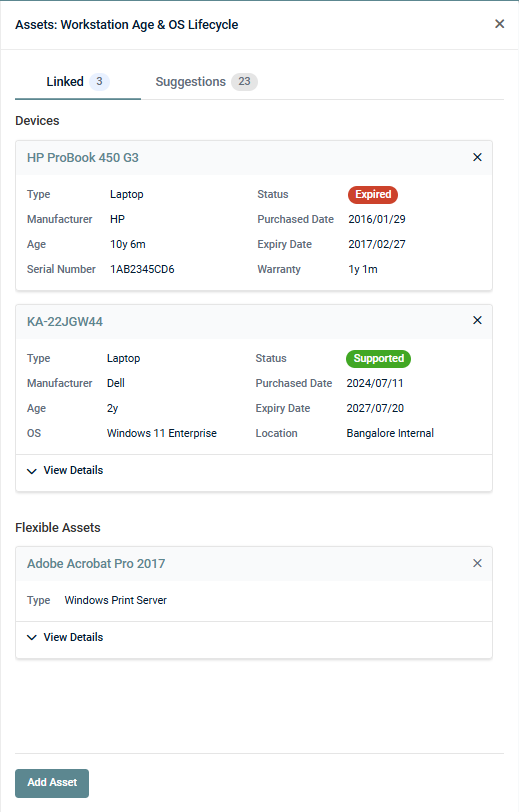
Each device card and flexible asset card displays the item's synced data. Fields with no data are hidden. For details about the device data fields available in myITprocess, refer to Device information and deduplication in Device Lifecycle Management overview.
Click View Details on a card to expand additional fields, if applicable.
The linked items are sorted by source. Click the name at the top of the card to open the record in its source application.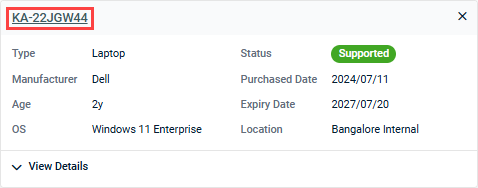
EXAMPLE Clicking the name of a device synced from IT Glue opens that IT Glue configuration page in a new tab, prompting you to log in to the integrated IT Glue account if not already logged in.
You have the option to remove a linked item that was originally accepted from a suggestion (or added manually). Clicking the × icon in the upper-right corner of the card unlinks the item and changes that suggestion's status to Rejected.
To manually search for additional devices or flexible assets to link, click Add Asset at the bottom of the pane. Refer to Add devices or flexible assets to a question manually.
Suggestions tab
This tab displays devices from the organization's inventory that are relevant to the question, filtered and ranked using the question profile. Suggested devices are sorted with older devices and expired warranties first.
Suggestion cards show name, type, manufacturer, age, warranty status, purchased date, expiry date, OS, and location information (as available). Fields with no data are hidden. Devices already linked to the question are not shown in this list.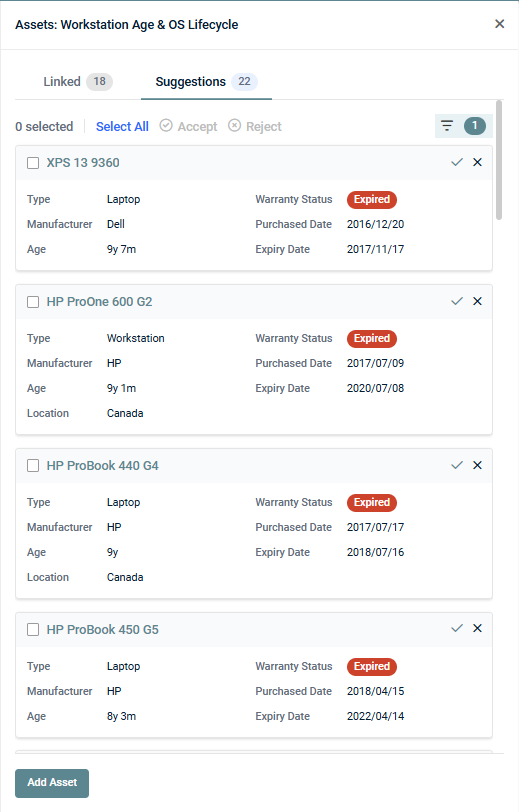
Filtering suggestions
Click the filter icon  in the Suggestions tab to filter the list by the following criteria:
- Manufacturer
- Warranty Status
- Type
- Age Group
- OS
- Suggestions: Filter by suggestion status. Pending is selected by default, showing only suggestions that have not yet been accepted or rejected. Select Rejected instead to show only previously rejected suggestions that are hidden by default. Rejected suggestions can be accepted at any time.
Click Reset to clear all filter selections.
To learn how to accept or reject suggestions, refer to Link suggested devices to a question (Accept) or Dismiss suggested devices for a question (Reject).
To manually search for additional devices or flexible assets to link, click Add Asset at the bottom of the pane. Refer to Add devices or flexible assets to a question manually.
How to...
Link suggested devices to a question (Accept)
To accept one or more suggested devices to link them to the question, complete the following steps in the Suggestions tab:
- Filter the list of suggestions as required. Refer to Filtering suggestions.
- Select the checkbox next to each device you want to link.
- At the top of the pane, click Accept.
TIP To accept all suggestions at once, click Select All and then click Accept. To accept a single device in one click, click the ✓ icon in the upper-right corner of the card.
Accepted devices are added to the Linked tab and carried through to any recommendations derived from the question.
Dismiss suggested devices for a question (Reject)
To dismiss a suggestion so it no longer appears in the default suggestions list for a question, complete the following steps in the Suggestions tab:
- Filter the list of suggestions as required. Refer to Filtering suggestions.
- Select the checkbox next to each device you want to dismiss.
- At the top of the pane, click Reject.
TIP To reject all suggestions at once, click Select All and then click Reject. To reject a single device in one click, click the × icon in the upper-right corner of the card.
Rejected suggestions are hidden by default. To view them, click the filter icon and select Rejected from the Suggestions drop-down menu. Rejected suggestions can be accepted at any time.
Add devices or flexible assets to a question manually
To view and link devices or IT Glue flexible assets that are synced for the organization but not listed in the Suggestions tab, click Add Asset in the lower-left corner of the Assets pane, and then select a tab to search within: Devices or Flexible Assets.
Devices
This tab displays the internal inventory for the organization, ordered by age. You can perform the following actions:
- Search by name, manufacturer, OS, or location using the search bar. Results are narrowed as you type.
- Filter by manufacturer, warranty status, type, age group, or OS using the filter menu .
- Click the device name at the top of any card to open the record in its source application.
- Select one or more devices using the checkbox(es), and then click Add in the lower-right corner of the pane to link the selected device(s) to the question.
Flexible Assets
This tab allows you to search for IT Glue flexible assets to link to the question. You must be logged in to your IT Glue account to use this option. Begin typing in the search bar to retrieve results.
Once results are populated, you can perform the following actions:
- Click the flexible asset name at the top of any card to open the record in IT Glue.
- Click View Details in any card to expand all available fields.
- Select one or more assets using the checkbox(es), and then click Add in the lower-right corner of the pane to link the selected asset(s) to the question.


