Using myITemplates
NAVIGATION Standards > Add Standard > Add from myITemplates
This article explains how to add sections, categories, and questions from myITemplates to your Standards Library.
myITemplates is a curated repository of standards designed to help MSPs deliver proactive IT leadership. The templates provide a structured, repeatable approach to technical alignment. Incorporating these standards enables you to replace reactive, inconsistent assessments with a documented baseline that drives meaningful conversations with clients, supports strategic recommendations, and reduces operational risk over time.
Templates are organized around the core areas of a well-managed IT environment. Each section establishes objective standards that make it easier to identify gaps, prioritize remediation, and communicate the business impact of technical findings to clients.
NOTE Several categories in myITemplates were informed by widely adopted security frameworks and control sets. Where this is the case, it is noted in the section descriptions below. However, a passing score on any category does not constitute compliance with any regulatory standard. Clients with specific compliance obligations require a dedicated compliance assessment.
Core standards
Expand the following drop-downs for descriptions of the core standards sections that are available by default in myITemplates.
 Infrastructure & Device Management
This section establishes the technical baseline for a well-managed environment, replacing informal or engineer-specific knowledge with a centralized, consistent set of standards.
Categories
- Network Infrastructure: Defines the standards for network design and security, including segmentation and enterprise firewall requirements. A documented network baseline reduces reactive support noise and gives the vCIO the objective data needed to make targeted, defensible recommendations. Informed by CIS Control 12 (Network Infrastructure Management).
- Endpoints & Device Management: Ensures all client assets are inventoried and actively supported. Maintaining a current, complete asset inventory is foundational to identifying lifecycle risk and driving device refresh conversations before failure occurs. Informed by CIS Control 1 (Inventory and Control of Enterprise Assets).
- Physical & Environmental Security: Addresses the physical conditions that protect hardware from failure or loss. Standards in this category support business continuity planning by ensuring environmental risks like power, temperature, physical access are identified and mitigated before they cause downtime.
Identity, Access & Microsoft 365
This section addresses the access control practices that protect client environments from the most common and impactful security threats. Objective standards in this area give the vCIO a clear, auditable picture of identity risk across the organization. Informed by CIS Control 5 (Account Management) and CIS Control 6 (Access Control Management).
Categories
- Multi-Factor Authentication: Establishes the baseline requirements for securing access to systems and data. Consistent MFA enforcement reduces exposure to credential-based attacks and supports the documentation requirements of many insurance and risk management processes.
- Microsoft 365 Security Configuration: Establishes the security baseline for the Microsoft 365 tenant, including the controls that govern how users authenticate, what activity is logged, and how the core platform is hardened.
- Intune & Device Compliance: Ensures that managed endpoints meet a defined security standard before being granted access to corporate resources. MDM enrollment and compliance policy enforcement are the prerequisites for Conditional Access device checks.
- Conditional Access & Intune: Defines specific, enforceable policies for device and identity management. These standards move access control from a general recommendation to an objective, measurable outcome.
- Remote Access & VPN: Ensures remote connectivity is secure and consistently configured. Standards in this category replace ambiguous practices (for example, unrestricted RDP access) with clear, auditable requirements.
- Password & Credential Policy: Addresses the credential practices that underpin every other access control in the environment. Weak or reused passwords remain one of the most common causes of account compromise. Objective standards for password length, breach detection, and password manager adoption reduce credential risk across the organization in a measurable, repeatable way.
Endpoint Security
This section focuses on the proactive defenses that prevent common threats from reaching the service desk. Standards here translate security best practices into objective, reviewable requirements that can be assessed consistently across all clients.
Categories
- Antivirus & EDR: Establishes the standards for endpoint protection tooling and coverage. Consistent endpoint defense reduces the volume of reactive incidents and provides a measurable baseline for security posture conversations. Informed by CIS Control 10 (Malware Defenses).
- Vulnerability Management: Defines the processes and cadence for identifying and addressing known vulnerabilities. Treating vulnerability management as an ongoing, documented practice rather than a one-time event supports risk reduction as part of a broader business continuity strategy. Informed by CIS Control 7 (Continuous Vulnerability Management).
Server Infrastructure & Service Operation
This section ensures the server environment is not just operational but actively managed and documented, reducing the risk of unplanned downtime and giving the vCIO the data needed to make informed infrastructure recommendations.
Categories
- Server Health & Configuration: Establishes standards for server lifecycle, configuration, and ongoing health. Keeping hardware within its supported lifecycle and configuration baseline prevents the kind of unpredictable failures that disrupt business operations.
- DNS, DHCP & Network Services: Ensures foundational network services are documented, stable, and consistently managed. These standards reduce systemic issues caused by undocumented or misconfigured network services. Informed by CIS Control 12 (Network Infrastructure Management).
- Monitoring & Alerting: Defines the requirements for proactive fault detection across the environment. Consistent monitoring standards verify that automated tools are functioning correctly and that alerts are reaching the right people, which is a critical component of any business continuity plan.
Backup & Business Continuity
This section addresses the practices that protect a client's ability to recover from disruption. Standards here go beyond verifying that backups exist. They ensure recovery is planned, tested, and aligned with the business's operational needs.
Categories
- Backup Coverage & Verification: Defines the requirements for backup scope, offsite storage, and immutability. These standards provide the objective evidence needed to support cyber insurance requirements and demonstrate due diligence in data protection. Informed by CIS Control 11 (Data Recovery).
- Recovery Planning: Establishes the process for identifying time-sensitive business functions and defining recovery objectives. Documented recovery planning ensures that a technical response to an incident maps to the client's actual operational priorities.
Documentation & Governance
This section ensures that the knowledge, processes, and decisions that underpin a client's IT environment are captured, current, and accessible, reducing reliance on individual expertise and supporting consistent service delivery.
Categories
- Asset & Configuration Documentation: Establishes the standards for maintaining accurate, up-to-date records of the client environment. Complete documentation reduces risk during incidents, audits, and engineer transitions.
- Risk & Compliance Governance: Defines the processes for ongoing risk identification and strategic planning. These standards support the vCIO in presenting a data-driven strategic roadmap to the client and in aligning IT decisions with business and insurance requirements. Informed by CIS Control 18 (Penetration Testing).
- User Onboarding & Offboarding: Standardizes the procedures for adding and removing users and access. Consistent, documented onboarding and offboarding practices ensure security controls remain effective and auditable as the client's team changes.
- Line of Business Applications: Covers the applications that are most operationally critical to the client's business, often the systems that would cause the greatest disruption if they became unavailable or were compromised. Documenting LOB applications, their ownership, support status, and backup coverage ensures that these assets are managed with the same rigor as infrastructure, rather than sitting outside formal IT processes.
- Content & Web Filtering: Addresses the controls that govern what users can access and install on managed endpoints. Web filtering and application control reduce the attack surface by blocking malicious content before it reaches the endpoint, and by preventing unauthorized software from being introduced into the environment.
Additional standards
In addition to the core standards library, myITemplates includes industry-recognized frameworks. Expand the following drop-downs for descriptions of these sections that are available by default in myITemplates.
SMB1001 framework
This section includes the full SMB1001 framework across all five industry-recognized maturity levels: Bronze, Silver, Gold, Platinum, and Diamond. These standards provide a structured, scalable approach to aligning a client's environment with their target maturity level.
UK Cyber Essentials v3.3
This section includes the UK Cyber Essentials v3.3 framework developed by the UK's National Cyber Security Centre (NCSC). Cyber Essentials provides a practical, security-focused baseline designed to help organizations defend against the most common cyber threats.
Adding standards from myITemplates to the Standards Library
Complete the following steps:
- In the top navigation menu, click Standards.
- In the upper-right corner of the page, click the Add Standard drop-down menu.
- Select Add from myITemplates.
- In the myITemplates pane that opens, you can do the following:
- Scroll through the full list of myITemplates sections.
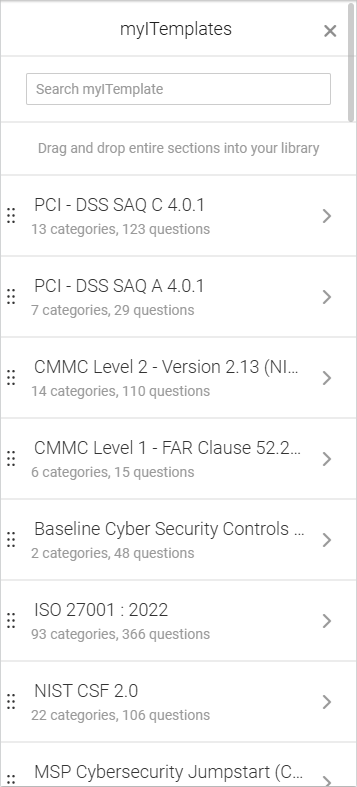
- Reference the number of categories and questions in each section.
- Search for specific sections using the search bar.
- Hover over a section title to see the full title.
- Click a section to view the full list of categories in that section.
- Scroll through the full list of categories in that section.
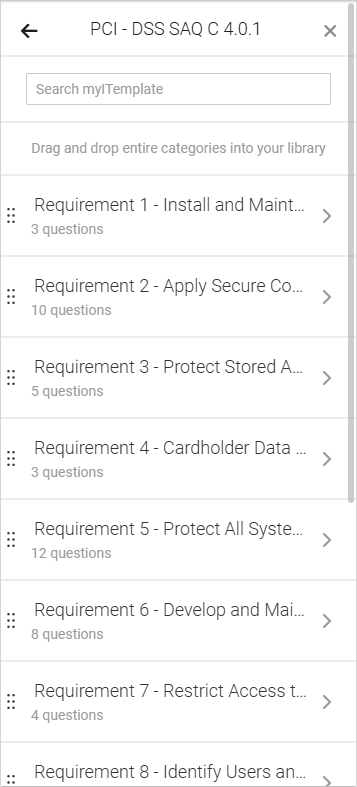
- Reference the number of questions in each category.
- Search for specific categories using the search bar.
- Hover over a category title to see the full title.
- Click a category to view the details of the questions in that category.
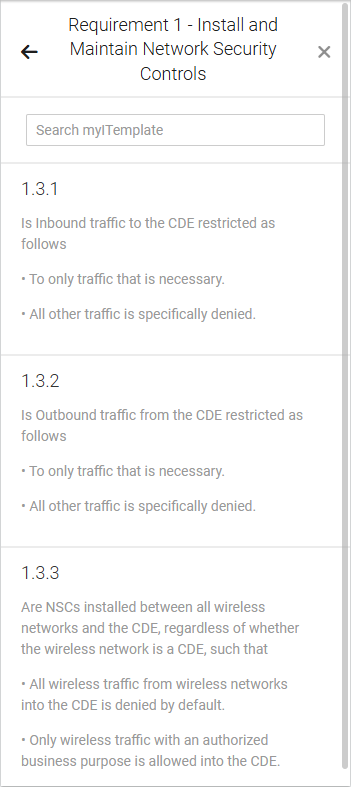
- Scroll through the full list of myITemplates sections.
- You can drag and drop an entire section (including all of its child categories and questions) into your desired spot in the Standards Library. You can also drag and drop an entire category (including its child questions) into a section that already exists in the Standards Library.
Click the back arrow in the upper-left corner of the pane as needed to return to the lists of categories and sections.
NOTE Individual questions cannot be dragged and dropped.
Adding standards from myITemplates to organization templates
Because myITemplates are designed for specific compliance scenarios, imported items are hidden for new organizations by default. They must be manually included in a client’s organization template. Refer to Including or excluding sections and categories in organization templates.
Restrictions for myITemplates standards
Standards marked with the myITprocess logo  have limited editing capabilities. You cannot modify the title text and question content for these standards.
These items are not exported if you export the Standards Library via Importing and exporting Standards Library templates. Therefore, they cannot be modified as part of an export.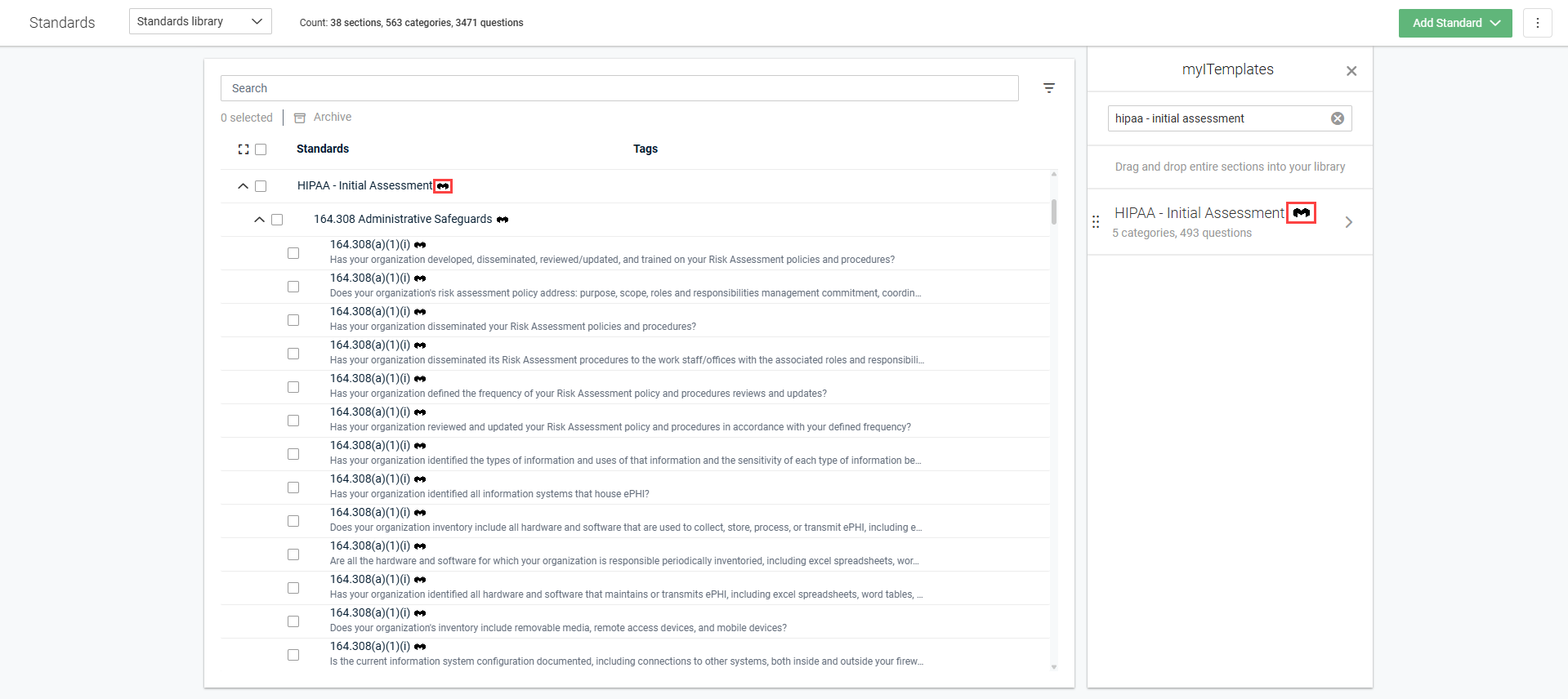
The items can be modified only in the following ways:
Sections
You can hide the section for new organizations, mark it for internal use only, assign or unassign specific organizations, and assign or remove tags.
Categories
You can modify the reminder period, hide the category for new organizations, mark it for internal use only, assign or unassign specific organizations, and assign or remove tags.
Questions
You can modify the question priority.


