Cisco integration
NAVIGATION My Account > Account Settings > Integrations > Connect Cisco
The Cisco integration retrieves Cisco SmartNet coverage, standard warranty, and end-of-life information for your Cisco hardware and displays it in the Device Warranty Lookup. Devices are discovered through your IT Glue configurations, and the serial number is used to look up each device in Cisco's Support APIs.
For an overview of the Device Warranty Lookup and device lifecycle management, refer to Device Lifecycle Management overview.
How it works
- Cisco credentials are entered once at the global level and apply to all organizations in your myITprocess account. No organization mapping on the Setup Organizations page is required.
- The integration covers standard Cisco hardware, such as switches and routers.
- Cisco Meraki devices are not supported by this integration and continue to sync through the existing Meraki integration. Refer to Cisco Meraki integration.
- Cisco devices and their serial numbers are sourced from IT Glue configurations.
- myITprocess does not use Cisco for device discovery.
Prerequisites
- Complete the Cisco API onboarding process.
- Create a Cisco application registration with access to EOX V5 API and Serial Number to Information API Version 2. The first provides end-of-life dates, and the second provides SmartNet coverage and warranty dates.
- Connect the IT Glue integration, and make sure your Cisco devices are documented as configurations with the manufacturer set to Cisco and a valid serial number entered. Refer to IT Glue integration.
How Cisco data is synced
Cisco data is refreshed automatically on the same schedule as the other hardware warranty integrations. You can also run a manual sync using the sync option on the Device Warranty Lookup page.
If Cisco is temporarily unavailable, myITprocess keeps the last data it successfully retrieved rather than clearing the dates on your devices.
Cisco limits how many requests can be made per day for each API credential. Very large device fleets may take longer to complete a sync.
To check the status of the integration, navigate to Account Settings > Integrations. Connection errors are shown in the status indicator for the Cisco integration. To fix a credential error, verify that the client ID and client secret are still valid in the Cisco API Console, and re-enter them in myITprocess.
How to...
 Connect the Cisco integration
A user with the IT Provider Admin role can connect the Cisco integration in myITprocess as follows:
- In the upper-right corner of the header, click your username (My Account) and select Account Settings.
- Click the Integrations tab.
- Locate Cisco in the list, and click Connect Cisco.
- Enter your Cisco API Console client ID in the Client ID field.
- Enter your Cisco API Console client secret in the Client Secret field.
- Click Connect.
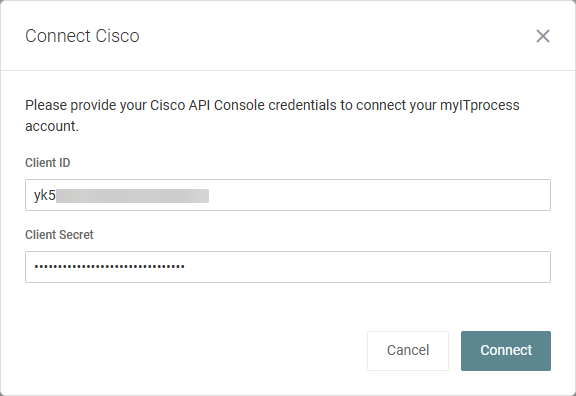
Once successfully authenticated, the Cisco integration shows as connected in the Integrations tab, and Cisco devices begin syncing.
If validation fails, the window stays open and the credentials are not saved. If an error occurs, verify the credentials in the Cisco API Console and try again.
NOTE Your client secret is stored encrypted and never displayed after it is saved.
View Cisco device details
Once the integration is connected, Cisco devices appear on the Device Warranty Lookup page. Either click the Device Warranty Lookup widget on the home page, or click Device Warranty Lookup in the more menu  on the Strategic Roadmap.
After selecting an organization from the drop-down menu in the upper-left corner of the page, you can filter the list of devices by manufacturer. Click a device row with Cisco in the Manufacturer column to open its details pane. Clicking View in IT Glue opens the device record in IT Glue.
The following values for Cisco devices are determined as described:
- Expiry Date: The SmartNet coverage end date when the device has active SmartNet coverage and the standard warranty end date otherwise. SmartNet coverage is available only for devices whose contract is delegated to the partner organization that registered the Cisco application. For devices without delegated access, the standard warranty end date is shown, even if the device is covered by a SmartNet contract.
- Status: The warranty status calculated from the Expiry Date value using the same logic and due-soon threshold as other vendors. Refer to Device warranty status setting in Device Lifecycle Management overview. Devices with a missing or invalid serial number show No Status.
- End-of-Life: The Last Date of Support announced by Cisco for the device model. This field is blank when Cisco has not announced an end-of-life date for the model.
The following do not apply to Cisco devices:
- Purchased Date is not retrieved from Cisco. If a purchase date is already filled in IT Glue, it continues to show.
- Other device details, such as operating system, IP address, location, and asset tag, come from IT Glue only.
Sync Cisco warranty and end-of-life dates to IT Glue
myITprocess can write the warranty expiration date and end-of-life date of your Cisco devices to the matching configurations in IT Glue. The warranty expiration date is written to the myITprocess: Warranty Expiration field, and the end-of-life date is written to the myITprocess: End-of-Life field. To enable this, complete the following:
- Connect the IT Glue integration and select the Enable Warranty Expiration Sync checkbox in the IT Glue sync settings. Refer to Configure IT Glue sync settings in myITprocess in IT Glue integration.
- Connect the Cisco integration, as described in Connect the Cisco integration.
- Make sure each Cisco device has a configuration in IT Glue with a valid serial number. myITprocess does not create configurations in IT Glue.
The dates written to IT Glue match the dates shown in myITprocess for each device. If myITprocess cannot retrieve data from Cisco, or the device serial number is not recognized, the existing date in IT Glue is left unchanged.
To learn how to see the dates in IT Glue, refer to Review warranty expiration and end-of-life data for configurations in IT Glue in IT Glue integration.
NOTE Dates are written only to the myITprocess-owned columns. myITprocess does not write to the native IT Glue expiration field.
Link Cisco devices to review questions
Refer to Smart Insights: Suggested devices. Linked Cisco devices are carried through to any recommendations derived from the question.
Create a recommendation for a Cisco device
You can add Cisco devices as assets when creating a recommendation from the Device Warranty Lookup page or the Strategic Roadmap. For full instructions, refer to Create a recommendation for a device in Device Lifecycle Management overview.
When adding assets to a recommendation, select Cisco from the source drop-down menu and select the applicable devices from the list.
You can add any number of Cisco devices to a single recommendation.
Include Cisco devices in exports and reports
Cisco devices are included automatically wherever other vendors appear.
- PDF and Excel exports on the Device Warranty Lookup page for an organization include Cisco devices, using the same columns as other vendors. Refer to Export device data in Device Lifecycle Management overview.
- The Hardware Warranty section in QBR reports includes Cisco devices with their expiration date, end-of-life data, and warranty status.


