myITprocess 6.5.9.0 release notes: April 14, 2026
This release includes enhancements and bug fixes.
Enhancements
Budget Report customization in QBR Report Builder
The Budget Report section in the QBR Report Builder now offers enhanced customization options, giving you greater flexibility when preparing data for clients. Additional filters allow you to refine data by initiative, recommendation status, and contract status, with defaults ensuring all options are included unless otherwise specified. The Budget Overview can be configured to display either quarterly or monthly data, and the Quarter Breakdown can be configured to show or hide service details for contracts.
Refer to Budget Report.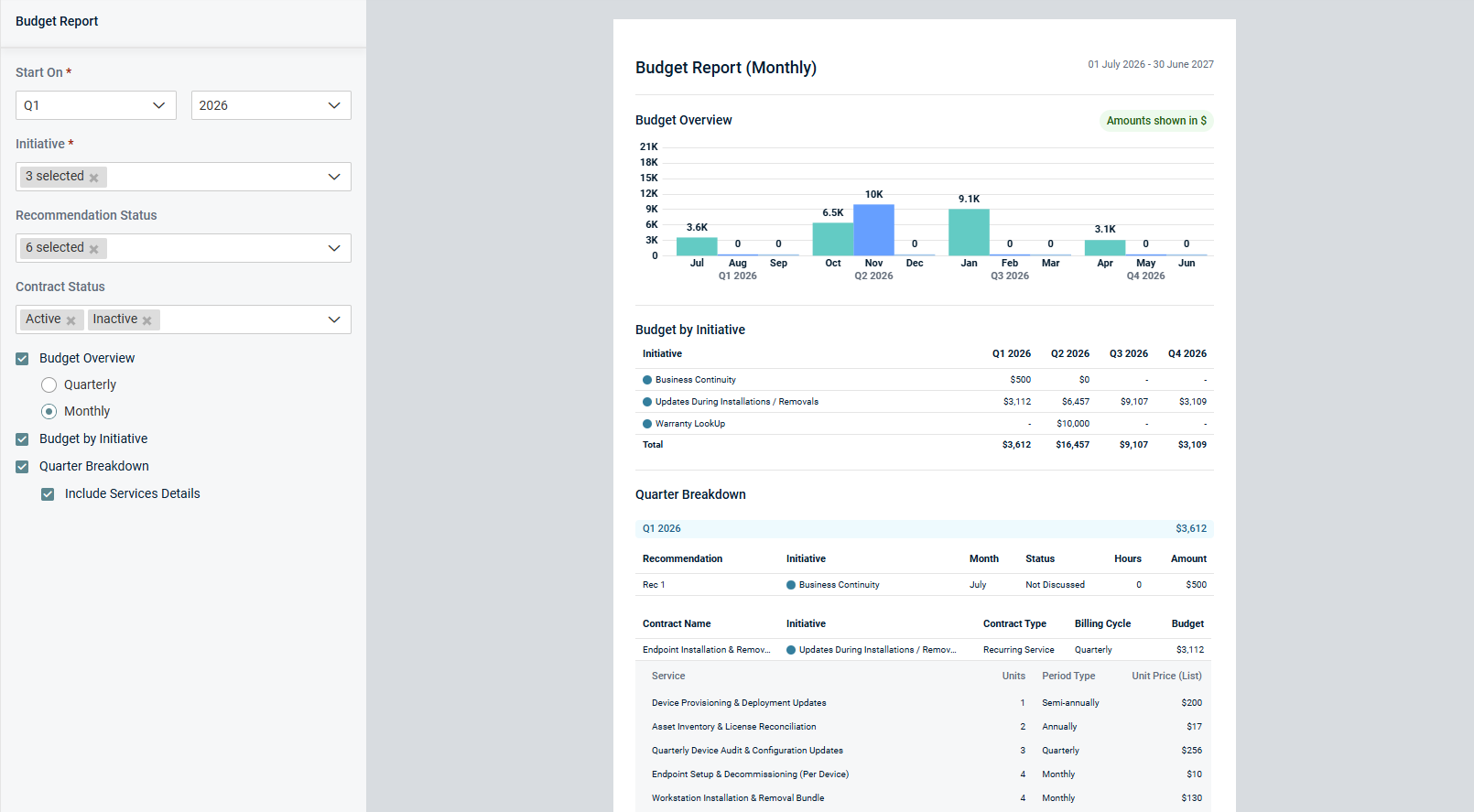
Mapping multiple Datto RMM sites
myITprocess now allows you to link multiple Datto RMM sites to a single myITprocess organization. This update removes the previous one‑to‑one limitation and makes it easier for MSPs and IT teams who manage multiple Datto RMM sites for the same client to keep reporting and QBRs aligned.
The Setup Organizations page now allows you to map more than one Datto RMM site to the same myITprocess organization and to view and manage all mapped sites in a single place.
Site‑specific views for executive summaries are now available within the same meeting or QBR report.
Why this matters
- Eliminates the need to create duplicate myITprocess organizations to handle multiple Datto RMM sites.
- Reduces administrative overhead for MSPs and IT departments managing complex environments.
- Provides clearer, more flexible reporting for QBRs and executive stakeholders.
Refer to Performing organization mapping.
Direct navigation to findings from recommendations
Navigation from Strategic Roadmap recommendations to alignment review findings has been streamlined with direct linking to the exact finding location. When a user clicks a review ID link in the Findings tab of a recommendation, the review page now automatically scrolls to the relevant finding, eliminating the need for manual filtering or searching. This enhancement reduces time spent locating findings in lengthy reviews and improves overall vCIO workflow efficiency.
Permanent user deletion for GDPR compliance
Permanent user account deletion has been implemented to help companies maintain GDPR compliance and data hygiene. When a user is deleted, their personal identifying information is removed or anonymized while preserving historical work such as completed reviews, recommendations, and QBR reports. If a user has in-progress reviews, myITprocess prompts the administrator to reassign those tasks to another user to ensure business continuity.
Refer to Delete a user account in Adding and managing users.
Enhanced template settings for Hardware Warranty reports
Users can now streamline Hardware Warranty report generation by defining exclusion and field selection settings directly within the QBR report template. This update allows for preconfiguring status and age group filters, ensuring consistency across reports for the same organization without repetitive manual entry. These settings are automatically applied to all new reports generated from the template.
Refer to Using the QBR Report Builder.
Fixes
- An issue where contracts could be added to the Strategic Roadmap without an assigned initiative when working across multiple organizations has been fixed. The Add option is now enabled only when an initiative is selected, ensuring that all contracts added to the roadmap include a properly assigned initiative.
- Long organization names are now fully visible on the Setup Organizations page, and error messages when organization names exceed character limits are now properly truncated.
- An issue affecting HP and Dell warranty lookups that caused incorrect dates, including a one-day difference due to time zone synchronization, has been resolved. Warranty data from these manufacturers is now accurately reflected.
- An issue impacting batch warranty processing for Lenovo devices has been fixed. The system now correctly returns results for entire batches, even when some serial numbers return No Data.
- Date range discrepancies in the Executive Summary section in the QBR Report Builder, which occurred in certain time zones, no longer prevent templates from saving successfully.
- Intermittent server errors and alerts on certain public API endpoints have been addressed.


