myITprocess 6.5.7.0 release notes: February 16, 2026
This release includes a new feature, enhancements, and bug fixes.
New feature
Microsoft 365 meeting sync
This release introduces the option to connect your Microsoft Outlook calendar to myITprocess. Manage meetings from a centralized location while automatically syncing availability, invitations, and updates across both myITprocess and Outlook.
Automatic Microsoft Teams link generation and streamlined event updates for internal and client-facing users help prevent duplicate invitations and keep attendee responses up to date.
Refer to Microsoft 365 meeting sync: Outlook integration.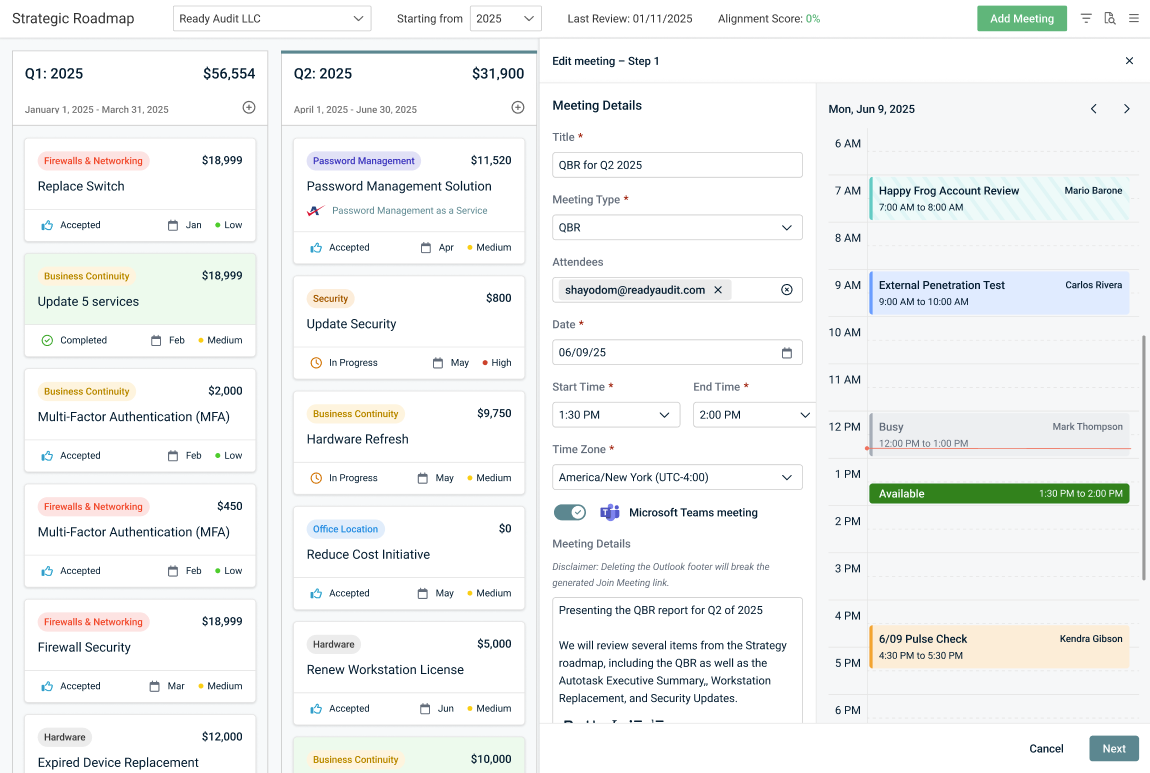
Enhancements
Customizable date and time formats
You can now select your preferred format for how dates and times are displayed in myITprocess, making information easier to read and aligned with your regional standards and workflows.
This enhancement delivers a more professional presentation of information to clients and greater consistency across the platform, helping your team stay organized and reducing confusion.
Refer to Configuring global account date, time, and currency settings.
New metrics in Datto RMM Executive Summary reports
You can now add more metrics and visualizations to your Datto RMM Executive Summary reports. These new charts and data points are available when building QBR and meeting reports:
- Device Anti-Virus Status: At-a-glance view of device protection.
- Device Patch Status: Quick visibility into patch compliance across your fleet.
- Software Update Status: Clear summary of software compliance.
- Alerts by Category: Visual breakdown of alert trends by type.
- Key Alerts: Highlight critical issues, including ransomware and endpoint security risks.
Gain a more comprehensive view of your environment and clearly showcase key trends and insights to your clients. With richer data and flexible visualization options, your reports become more informative, impactful, and tailored — helping you deliver greater value in every QBR.
Refer to Datto RMM: Endpoint Monitoring and Management Report in Integrated Executive Summary reporting.
Copying QBR reports
The option to copy existing QBR reports is now available. You can use this option to quickly replicate an existing reporting structure and QBR narrative for a new time period.
Refer to Copy a QBR report in Using the QBR Report Builder.
New versions in myITemplates
- The CMMC version 2.13 Level 1 and 2 are now available in myITemplates.
- The PCI DSS Self Assessments A and C version 4.0.1 are now available in myITemplates.
Get Review API Endpoints
Additional data has been added to the Get Review API Endpoints. You can now retrieve the following fields:
- Engineer Due date
- Engineer Complete date
- vCIO Due date
- vCIO Complete date
Fixes
- An issue where creating a recommendation failed despite the opportunity being successfully created in Autotask has been resolved. You can now create recommendations successfully without errors or duplicate entries.
- You can now successfully upload up to 10 PDF files to each of your QBR reports.
- Executive Summary report widgets now correctly display the date(s) selected in the Date Range field.
- In reviews, archived categories and questions are no longer automatically unarchived when reordered or moved to a different section or category.


